Driver display
Driver display overview
The driver display is located behind the steering wheel. It supplies the driver with all the basic information needed to drive the car, such as driving speed, reminders, battery charge, and other information.
Warning
Never use the car if the driver display or parts of the driver display are not activated or readable. A malfunctioning driver display might not be able to show necessary information to the driver, which could result in death or serious injury.
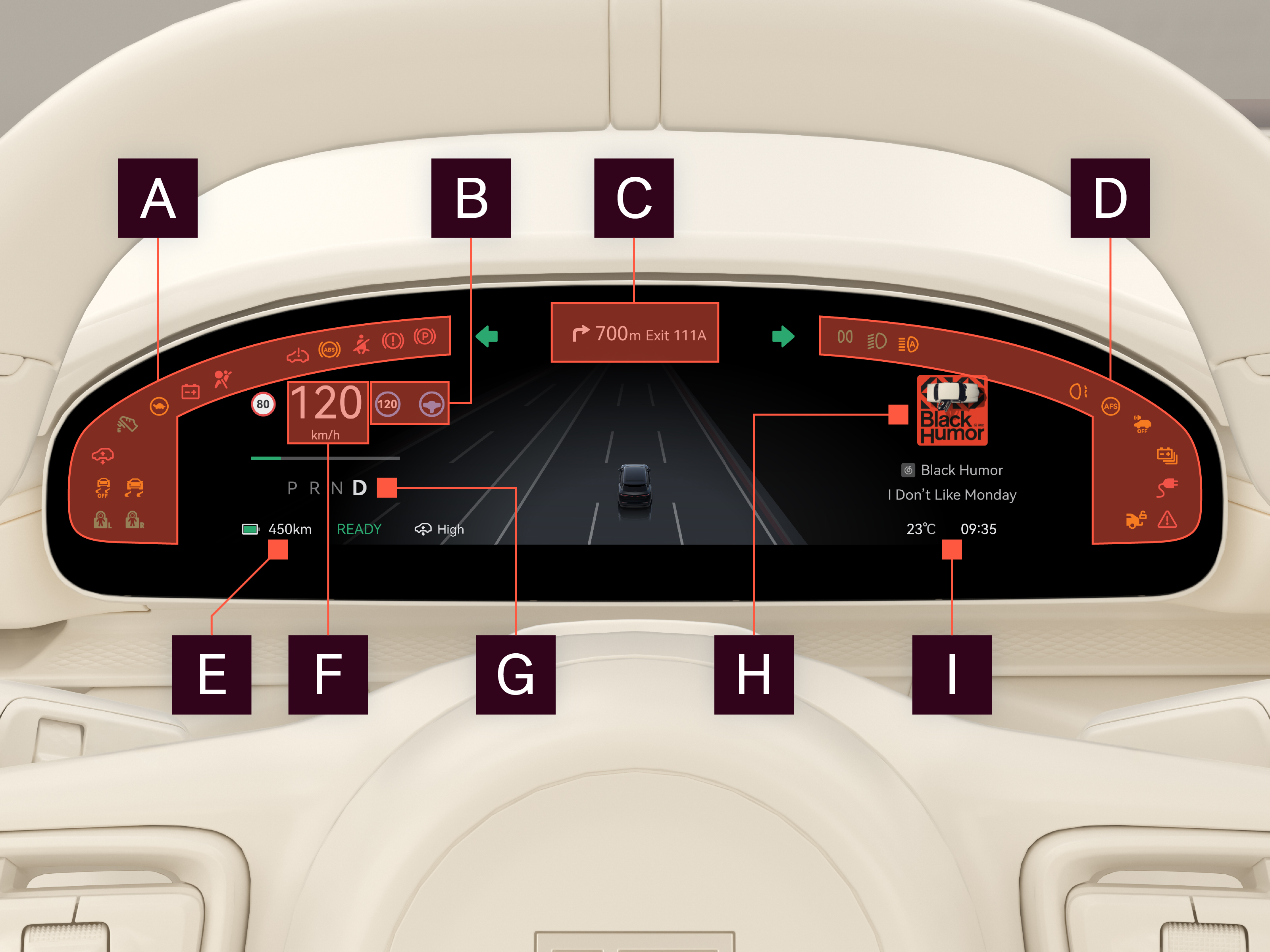
Display areas

Symbol display area
Any current function indicators or warning symbols.

Driver assistance symbols area
Current driver assistance function indicator.

Navigation
Navigation instructions for set navigation destination.

Symbol display area
Any current function indicators or warning symbols.

High voltage battery status
Current high voltage battery charge and estimated driving range.

Driving speed
Current driving speed and speed limit.

Gear indicator
Current gear.

Climate/range/multimedia
The user's choice of climate, range, or multimedia information. When there is a problem with the car, relevant car status information is displayed.

Time and temperature
Current time and ambient temperature.
Note
The driver display information changes depending on the state of the car, such as during charging.
For driver display cleaning information, see "Screen cleaning".